
See Email Authentication Headers in Competitive Insights
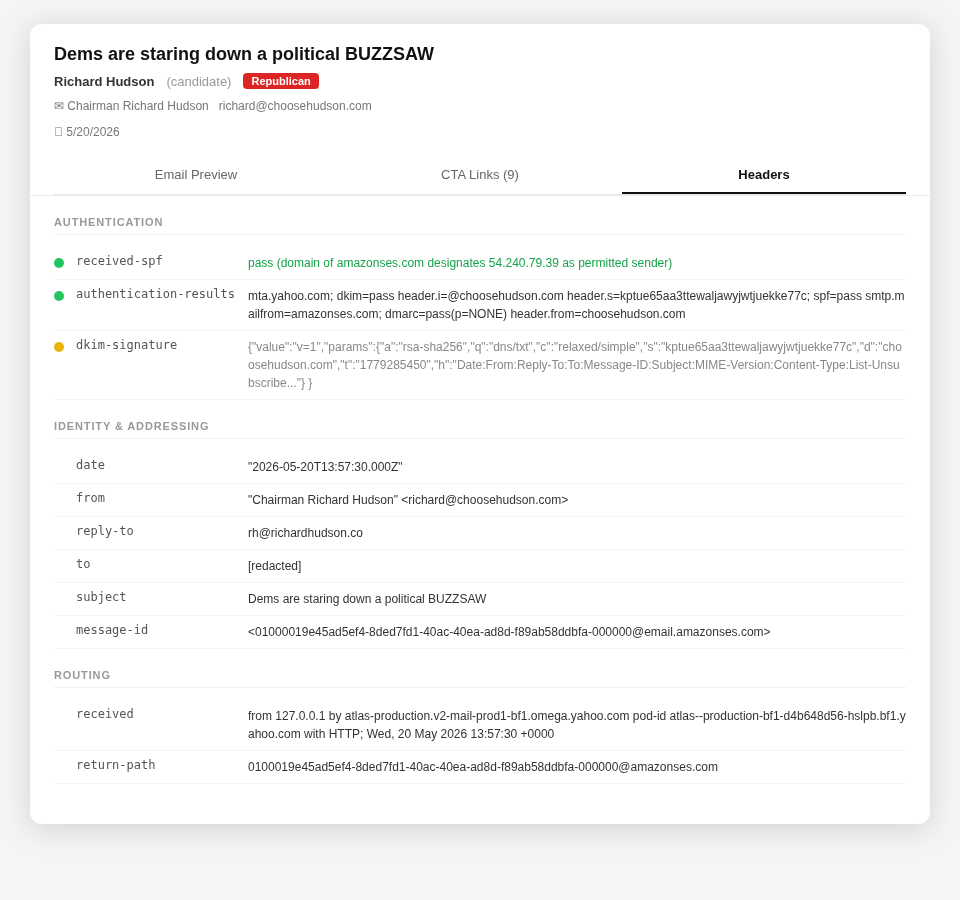
Professional and Enterprise subscribers can now view the raw email authentication headers for any email in Competitive Insights. Open any email, click the new Headers tab, and you'll see a clean breakdown organized into four sections.
Authentication — Shows SPF, DKIM, and DMARC results with color-coded indicators: green for pass, red for fail, yellow for neutral. At a glance you can tell whether a sender's authentication chain is legitimate — useful for spotting campaigns that are misconfigured or spoofing a sender identity.
Identity & Addressing — Displays the From, Reply-To, Sender, Subject, and Message-ID headers so you can see exactly who sent the message and where replies would go.
Routing — Shows the full Received chain, letting you trace which mail servers handled the message and in what order.
Other — Captures everything else: List-Unsubscribe, Feedback-ID, X-Mailer, and any other headers present in the message.
This feature is available to Professional ($300+) and Enterprise subscribers. If you work in email compliance, deliverability, or competitive research, the Headers tab gives you the technical layer that's normally hidden behind the inbox.