
Slack Alerts: Know the Moment a Campaign You Follow Hits the Inbox
The fastest way to react to a competitor's email is to know it went out. Slack Alerts, now available to Professional and Enterprise subscribers, pushes a message into your Slack workspace the moment a new email or text is ingested for an entity your account follows — no refreshing the Competitive Insights feed, no waiting on a digest.
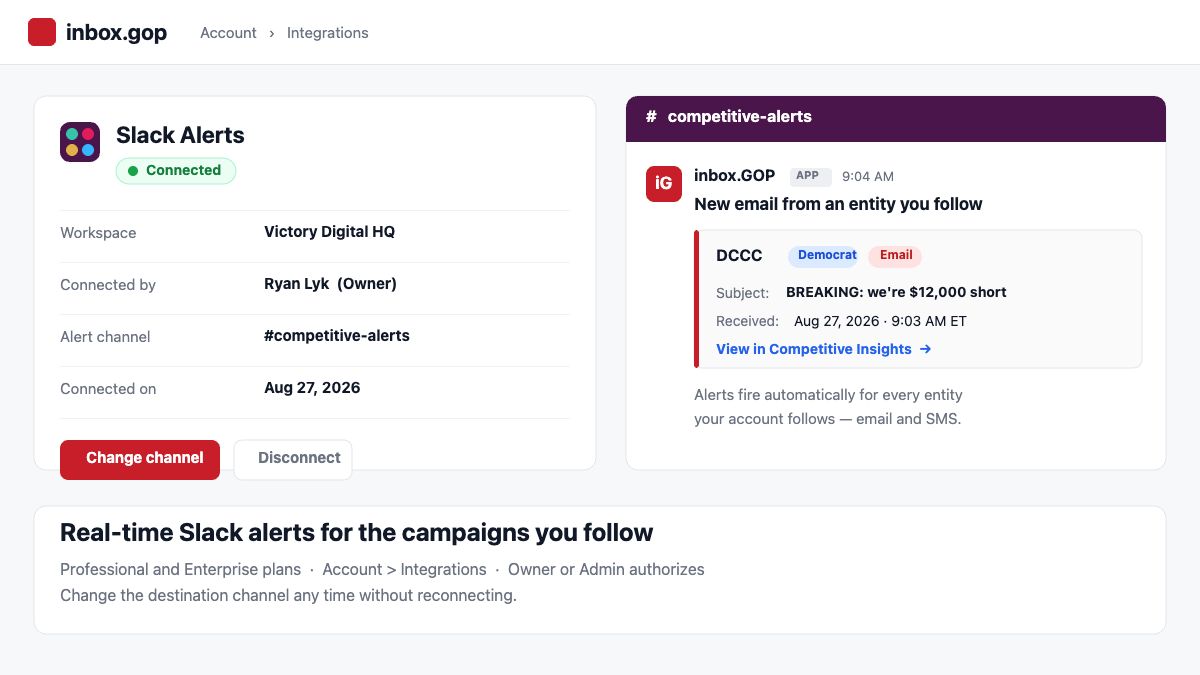
Each alert lands in the channel you choose and includes the sending entity, its party, the message type, the subject line, and when it was received, plus a direct link into Competitive Insights so you can read the full email and its headers in one click.
Setting it up
Slack Alerts live under Account > Integrations. An Owner or Admin on the account authorizes the connection, invites the inbox.gop bot into the channel that should receive alerts, and selects that channel as the destination. Once it is connected, the Integrations page shows your workspace, the user who connected it, the destination channel, and the date the connection was made — so anyone with admin access can see the current state at a glance.
What triggers an alert
Alerts fire automatically whenever a new email or SMS is ingested for an entity your account follows. There is no separate alert list to maintain: the integration uses the same follow relationships that already power the entity filter in Competitive Insights. Follow a campaign, committee, or PAC, and it starts feeding your Slack channel. Unfollow it, and the alerts stop.
Changing the destination channel
Priorities shift over the course of a cycle, and the channel that made sense in the spring is not always the right one in October. Owners and Admins can move alerts to a different channel at any time with the new Change channel option — no need to disconnect and re-authorize the whole integration. The channel picker uses the same followed-and-relevant-first ordering as the entity filter, then falls back to alphabetical, so it behaves the way the rest of the product does.
Why it matters
Competitive email intelligence is only useful if it reaches you while the message is still live. When the other side sends a fundraising appeal off a breaking news moment, the window to respond is measured in hours, not days. Putting those sends in front of your team in Slack — where they are already working — turns the Competitive Insights database from something you check into something that tells you when to look.
Slack Alerts are included with Professional and Enterprise plans at no additional cost. Head to Account > Integrations to connect your workspace.